

Hoverboards are generally water resistant to only a limited degree, mostly protecting against splashes or light rain, not full submersion or heavy moisture.
You shouldn’t ride through puddles or in the rain, as water can cause short circuits, sensor errors, and battery damage.
Even models with IPX4 or IPX7 ratings require careful handling to avoid corrosion and warranty issues.
Understanding these limits and proper care after exposure can help prolong your hoverboard’s life.
Key Takeaways
- Hoverboards generally offer water resistance against splashes but are not fully waterproof or suitable for submersion.
- Most hoverboards have an IP rating like IPX4, protecting against light rain and splashes but not heavy water exposure.
- Water exposure risks include electrical short circuits, corrosion of internal components, and sensor malfunctions.
- Riding through puddles or wet conditions may void warranties and damage lithium-ion batteries and motherboards.
- Immediate drying, powering off, and careful battery removal are essential after any water exposure to prevent permanent damage.
What Is Water Resistance on Hoverboards?
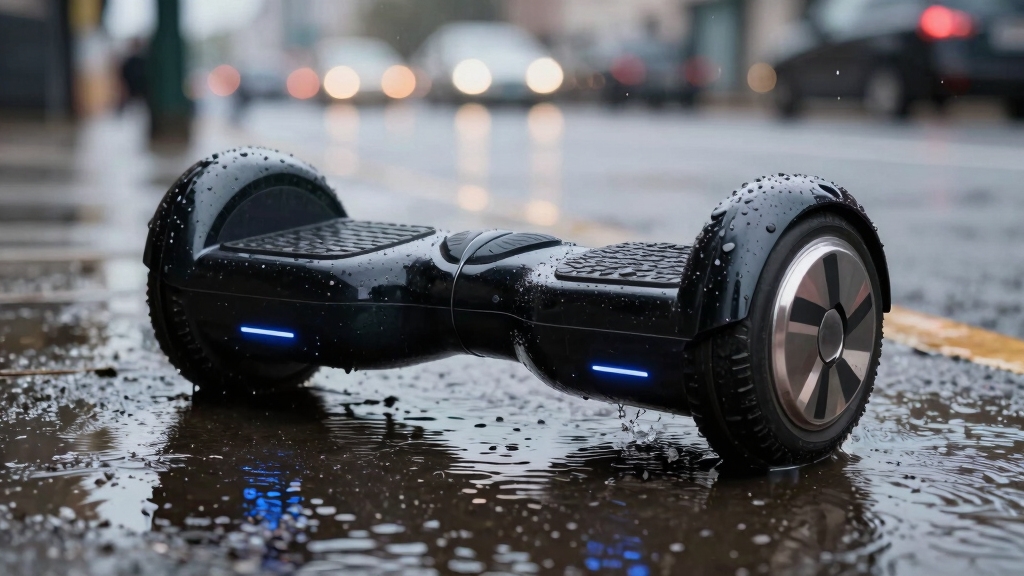
When it comes to hoverboards, water resistance refers to their ability to withstand exposure to water splashes or light moisture without sustaining damage.
Water resistance in hoverboards means they can handle splashes or light moisture without damage.
You should understand that this resistance protects mainly against incidental contact with water, such as light drizzle or splashes, but not submersion.
Hoverboards typically have external components designed to repel water to a limited extent, but internal elements like the motherboard and lithium-ion battery remain vulnerable.
You must avoid riding through puddles or exposing the device to heavy rain, as water intrusion can cause short circuits and corrosion.
No hoverboard is fully waterproof due to the inherent risk of electrical failure.
Consequently, using the hoverboard cautiously around moisture is essential to prevent damage and maintain functionality.
Most hoverboards lack high IP ratings such as IPX4 or above, which are necessary to ensure reliable water resistance in electric scooters and similar devices.
How IP Ratings Show Hoverboard Water Protection?
Although hoverboards vary in their ability to resist water, the IP rating system provides a clear standard to gauge their protection level.
This two-digit code measures dust and water resistance, helping you understand what exposure your hoverboard can handle safely.
The first digit rates dust protection; the second rates water resistance from 0 (no protection) to 8 (submersion).
For hoverboards, common water ratings include IPX4 (splash protection) and IPX7 (temporary submersion).
You should always check the IP rating before using your hoverboard near water to avoid damage.
Key points to reflect on:
- IPX4 protects against splashes from any direction.
- IP54 adds limited dust protection.
- IPX6 withstands powerful water jets.
- IPX7 tolerates brief immersion.
- No hoverboards are fully waterproof despite high ratings.
Proper maintenance after exposure to moisture, such as drying and inspection, is essential to prevent water damage and corrosion.
Water Damage Risks for Hoverboards

Exposing your hoverboard to water markedly increases the risk of short circuits, corrosion, and electrical malfunctions.
Water intrusion can damage critical components such as the motherboard and lithium-ion battery, leading to costly repairs or permanent failure.
Even models with IPX4 ratings, which resist splashes, aren’t designed for submersion or heavy moisture exposure.
Sensors may malfunction due to dampness or mud accumulation, impairing device responsiveness and safety.
Riding through puddles or wet terrain voids warranties by classifying the damage as improper use.
You should avoid any contact with standing water and make certain the charging port remains dry.
If your hoverboard does get wet, power it off immediately and follow recommended drying procedures to minimize internal damage and prevent further electrical risks.
Proper storage in dry, cool environments and routine maintenance are essential to preserve battery health.
Can You Ride a Hoverboard in the Rain or Puddles?
You shouldn’t ride a hoverboard in the rain or through puddles, even if it has an IPX4 rating or higher.
While such ratings indicate splash resistance, they don’t guarantee protection against water infiltration that can damage internal electronics.
Ratings show splash resistance but don’t ensure protection against water seeping into sensitive electronics.
Water exposure risks include short circuits, corrosion, and sensor malfunctions, which can lead to costly repairs or permanent damage. Avoiding wet conditions secures reliability and safety.
Consider these precautions before riding in damp environments:
IPX4 resists splashes but not sustained water contact. Puddles may submerge critical components like the motherboard. Wet footpads interfere with sensor accuracy. Warranty may be voided by water damage.
Always dry and inspect your hoverboard after accidental exposure.
Stay cautious to protect your device’s longevity and performance.
For added protection, consider using smart locks and electronic security features to monitor and safeguard your device.
Best Hoverboards for Water Resistance
When choosing a hoverboard with water resistance, you’ll want to focus on models rated IPX4 or higher to guarantee reliable protection against splashes and light rain.
All-terrain hoverboards with 10-inch inflatable wheels typically meet this IPX4 standard, providing a balance between durability and water protection.
For enhanced defense, consider models like the iHoverboard H1, which achieves an IP54 rating, offering splash resistance plus partial dust protection.
If you require superior water resistance, explore IPX6-rated boards that can handle heavier rain exposure without immediate damage.
Though IPX7 models exist and can survive temporary submersion, they come at a higher price and still aren’t fully waterproof.
Always check the manufacturer’s specifications carefully to confirm the exact IP rating before purchase.
Additionally, selecting hoverboards with pneumatic tires can improve ride comfort and provide better traction on wet surfaces.
How to Protect Your Hoverboard From Water Damage?
Selecting a hoverboard with a suitable IP rating minimizes water risks, but further precautions guarantee your device stays functional.
You must actively prevent exposure to moisture, as even water-resistant models aren’t waterproof. Protect sensitive components like the battery and motherboard by avoiding puddles, rain, and wet terrain.
Maintain the device properly to reduce corrosion and malfunctions.
To protect your hoverboard from water damage, you should:
- Avoid riding in rain, puddles, or muddy areas
- Use waterproof covers when necessary for splash protection
- Wipe down the exterior and charging ports after exposure
- Store the hoverboard in a dry, temperature-controlled environment
- Turn off the device immediately if it becomes wet
These steps reduce risks of electrical shorts and extend your hoverboard’s lifespan. Additionally, ensuring the battery meets UN 38.3 safety standards helps prevent hazards related to moisture exposure.
What to Do Immediately If Your Hoverboard Gets Wet?
So, if your hoverboard happens to get wet, the first thing you want to do is power it off right away. This helps to prevent any electrical shorts from happening.
Next, you’ll want to carefully remove the battery—this is super important to avoid any further damage and to keep things safe.
After that, make sure to thoroughly dry all the components. It’s crucial to let everything dry out completely before you think about using or charging the device again.
Trust me, taking these steps will help keep your hoverboard in good shape!
Power Off Immediately
Immediately power off your hoverboard the moment it gets wet to prevent electrical shorts and further damage.
Continuing to operate a wet hoverboard risks corrosion and permanent failure of sensitive components like the motherboard and battery.
Once powered off, avoid attempting to charge or use the device until it’s completely dry.
Follow these critical steps immediately after powering off:
- Disconnect from any power source or charger.
- Move the hoverboard to a dry, well-ventilated area.
- Avoid shaking or tilting the device aggressively.
- Do not press any buttons or attempt to restart it.
- Inspect for visible water ingress, especially around ports and seams.
Taking prompt, careful action minimizes internal damage and improves the chance of recovery.
Protecting components with waterproof ratings (IP54+) helps reduce moisture exposure risks and electrical malfunctions.
Remove Battery Safely
Locate and disconnect the battery as soon as you power off your wet hoverboard to guarantee electrical shorts and further damage.
Carefully unscrew the casing using appropriate tools to avoid stripping screws or damaging internal components. Once opened, identify the battery connector, usually a plug linking the battery to the motherboard, and gently unplug it without forcing or bending connectors.
Wear insulated gloves if available to reduce shock risk. Avoid touching other internal parts to prevent static discharge or inadvertent damage.
Place the battery in a dry, ventilated area away from direct heat or sunlight. Don’t attempt to charge or use the battery until a thorough inspection confirms it’s completely dry and functional.
If uncertain, consult a professional technician to guarantee safe handling and prevent voiding warranties.
Always ensure you use the manufacturer-approved charger when you eventually recharge the battery to maintain safety and battery health.
Dry Components Thoroughly
Once you’ve powered off and removed the battery, you should thoroughly dry all internal components to prevent corrosion and electrical shorts.
Start by carefully unscrewing the casing and extracting the motherboard, sensors, and wiring. Use a lint-free cloth or compressed air to remove moisture.
Avoid using heat sources that may damage delicate parts. To enhance drying, place components in uncooked rice or silica gel packets for 12–24 hours.
Do not attempt charging until fully dry.
Key steps to dry components thoroughly:
- Disassemble carefully to access all parts.
- Remove visible moisture with cloth or compressed air.
- Avoid direct heat or high temperatures.
- Use desiccants like rice or silica gel for absorption.
- Wait 12–24 hours before reassembly or charging.
Following these precautions minimizes water damage risks effectively.
Additionally, inspecting the wiring for damage or corrosion before reassembly helps ensure safe and reliable operation of your hoverboard’s electrical system.
How to Store and Charge a Hoverboard Safely in Damp Conditions?
When storing and charging your hoverboard in damp conditions, you should make sure the device is completely dry and kept in an environment with controlled temperature and humidity levels between 5-40°C.
Place the hoverboard on a non-conductive, elevated surface to prevent moisture accumulation. Use a waterproof cover to shield it from ambient dampness without sealing it airtight, which could trap humidity.
Before charging, verify the charging port and connectors are fully dry to avoid short circuits. Maintain a moderate charge level, ideally around 50-70%, to preserve battery health in fluctuating humidity.
Avoid charging in direct contact with damp floors or near water sources. Regularly inspect the device for corrosion or moisture ingress signs.
Always disconnect the charger immediately if you detect any unusual heat or odor during charging.
Additionally, storing batteries at 40–60% charge in cool, dry places can significantly extend their overall battery lifespan.
When to Get Professional Repair for Water Damage?
If your hoverboard shows signs of malfunction after water exposure, such as unresponsive controls or erratic sensor behavior, you should promptly seek professional repair.
Attempting DIY fixes can worsen internal damage, especially with sensitive components like the motherboard and battery.
Consider professional service if you encounter persistent power issues despite drying efforts.
Visible corrosion or residue on circuit boards is another warning sign.
If sensors are malfunctioning or giving inconsistent readings, it’s time to consult a professional.
A battery that isn’t charging or overheating also indicates the need for expert attention.
Unusual noises or electrical smells should never be ignored.
Early intervention prevents further damage and reduces replacement costs.
Professionals use specialized tools to diagnose water intrusion, assess corrosion, and repair or replace critical parts safely.
Don’t delay repairs; water damage often worsens over time, risking permanent failure and voiding warranties.
Frequently Asked Questions
Can Hoverboards Be Used Near Swimming Pools Safely?
You shouldn’t use hoverboards near swimming pools safely due to water risks.
Even models with IPX4 ratings resist splashes but aren’t waterproof.
Poolside environments pose submersion hazards, risking short circuits and battery damage.
Avoid riding on wet surfaces or puddles, and never expose the device to water fully.
Always keep your hoverboard dry and store it away from moisture to prevent malfunction and voiding warranties.
Do Water-Resistant Hoverboards Affect Battery Life?
You might think water-resistant hoverboards don’t impact battery life, but exposure to moisture—even minimal—can degrade your lithium-ion battery over time.
While IPX4 or higher ratings protect against splashes, repeated dampness causes corrosion and short circuits, reducing battery efficiency and lifespan.
To preserve battery health, avoid wet conditions, dry the board promptly, and never charge it if damp.
These precautions help maintain peak performance and safety.
How Long Does It Take a Hoverboard to Dry After Getting Wet?
It typically takes 12 to 24 hours for a hoverboard to dry after getting wet if you remove the battery and internal components properly.
You should power off the device immediately, unscrew the casing, and place the parts in uncooked rice or use a desiccant to absorb moisture.
Avoid charging it until completely dry to prevent short circuits or damage.
For severe cases, seek professional inspection to guarantee safety and functionality.
Are Hoverboard Warranties Voided After Water Exposure?
You should know that hoverboard warranties typically don’t cover “unintended water encounters.”
If your device suffers damage from moisture, manufacturers usually classify it as improper use, voiding the warranty.
To protect your investment, avoid riding in wet conditions and promptly dry any dampness.
Always check your specific warranty terms, as water-related issues often require professional repair at your expense due to the vulnerability of electrical components.
Can Hoverboard Sensors Be Recalibrated After Water Damage?
Yes, you can recalibrate hoverboard sensors after water damage, but success depends on damage severity.
First, make certain the board is completely dry before attempting recalibration, as moisture can cause false readings.
Use the manufacturer’s specific calibration procedure, often involving placing the board on a level surface and powering it on.
If sensors remain unresponsive or erratic, professional repair or sensor replacement may be necessary to restore proper function safely.
Protect Your Hoverboard from Hidden Water Damage
While hoverboards aren’t quite like a knight’s armor from the Middle Ages, their water resistance is limited and should never be taken for granted.
You need to check the IP rating carefully and avoid riding through heavy rain or deep puddles to prevent costly damage.
Always dry your board promptly, store it in a dry place, and seek professional help if water seeps inside. Staying cautious protects your investment and keeps your ride safe.